
Payroll can be outsourced without handing over your workforce decisions. Outsourced payroll services in San Mateo can take on payroll processing, tax filing, and related administration, giving your team more room to focus on running the business.
For a mid-sized company, payroll involves more than issuing paychecks. Employee changes, reporting, and filing tasks all need to fit into a reliable process. The right support can ease the administrative load while keeping payroll connected to your business needs.
This article explains what outsourced payroll can cover, how payroll administration and tax filing fit into the process, and what San Mateo County businesses should consider when arranging support. It also looks at how payroll can connect with broader accounting and advisory needs as your workforce changes.
Key Takeaways
- See how outsourced payroll can bring pay processing, tax reporting, and employee administration into a more coordinated workflow.
- Learn how monthly, quarterly, and annual reports support payroll recordkeeping and tax filing throughout the year.
- Identify the payroll details your team should organize, from employee changes to the information needed for accurate filings.
- Compare payroll support by considering tax filing, customer support, software compatibility, employee count, and applicable local requirements.
- Explore how payroll can connect with broader accounting and advisory support as your mid-sized business grows.
Full-service payroll processing
Payroll processing coordinates the work behind each pay run, from collecting employee changes to preparing pay records. For a mid-sized business, use one approved source for hours, salary changes, bonuses, deductions, and new-hire details. Have a manager review unusual items before finalizing payroll, leaving time to resolve missing information before payments are prepared.
Outsourced payroll processing shifts routine calculations and administration to a service provider, while your business remains responsible for accurate information and key approvals. Set a regular timesheet deadline and assign an internal owner to collect updates, such as a new hire’s start date or a changed bank account. Clear responsibilities give both teams a consistent review point.
California's statewide minimum wage is $16.90 per hour, according to the California Department of Industrial Relations. Include the applicable pay rate in employee records and compare it with current payroll information before processing. If a rate changes, update the approved record and check that the next pay calculation reflects it. Keep the approval with the change history.
Year-end payroll also involves preparing tax forms. W-2 forms summarize employee wages and withholdings. A W-3 sends summary information about W-2 forms, while 1099 forms cover reportable payments to nonemployees, where applicable. Keep employee and contractor records separate. Before preparing forms, compare names, identification details, payment totals, and payroll information for accuracy.
- Gather approved hours, pay changes, and employee details before each pay run.
- Review unusual items, such as missing time entries or a recent pay change.
- Compare year-end totals with payroll records before preparing W-2, W-3, or 1099 forms.
- Save approval records and notes about corrections for future reference.
Payroll outsourcing can involve risks such as incorrect information, missed handoffs, delays, and unauthorized access to employee data. Reduce them by limiting access to those who need it, sharing files securely, and assigning an internal reviewer for changes and final totals. A documented approval step can catch errors before the pay run is complete.
The cost of outsourced payroll services in San Mateo varies with employee count, pay frequency, and payroll complexity. Pricing is provided after a quote request.
Before choosing support, map your process from time entry through approval and tax-form preparation. Note who supplies employee updates, checks calculations, and maintains payroll records. Then compare the provider’s support, tax-filing scope, and compatibility with your existing systems. This shows where outside processing fits and which review tasks should remain internal.
Monthly, quarterly, and annual payroll tax reports
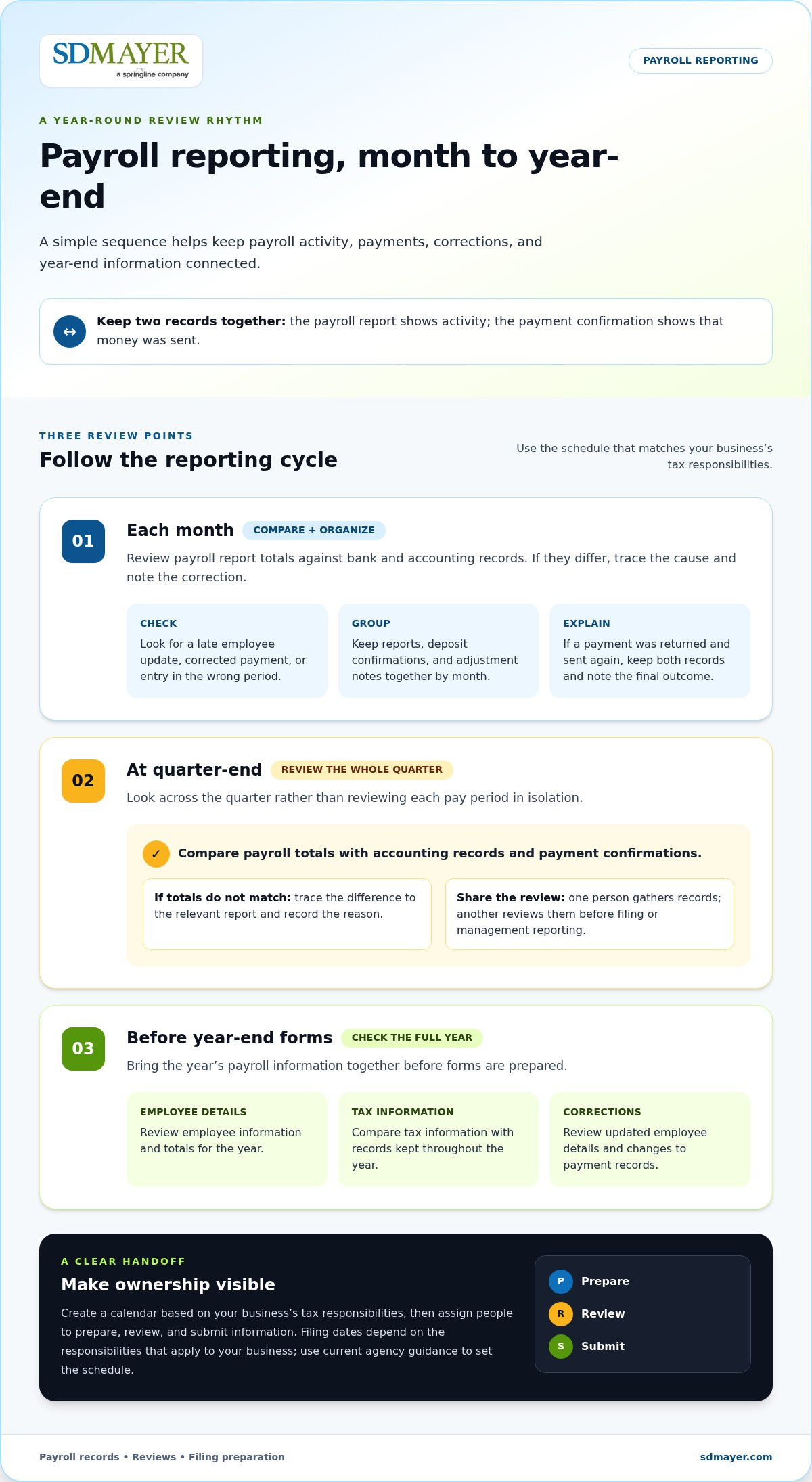
Payroll reports help your business review tax information across different periods. Each month, compare report totals with bank and accounting records. If they differ, check for a late employee update, a corrected payment, or an entry recorded in the wrong period. Add a brief note explaining each correction so the next reviewer can follow what changed.
Monthly reviews give managers a regular view of payroll activity and payments. Group reports, deposit confirmations, and adjustment notes by month. If a payment was returned and sent again, for example, keep both records together and note the final outcome. This makes the monthly file useful for answering questions and preparing financial summaries.
At quarter-end, review the quarter as a whole rather than looking at each pay period in isolation. Compare payroll totals with accounting records and payment confirmations. If a total does not match, trace it to the relevant report and record the reason for the difference. Assign one person to gather the records and another to review them before using the information for filing or management reports.
Annual reporting brings the year’s payroll information together. Before preparing year-end forms, compare employee totals and tax information with records kept throughout the year. Review corrections, including updated employee details or changes to payment records. Complete records and clear approval notes help the person preparing the forms understand the final figures.
- Keep each month’s payroll reports, payment confirmations, and correction notes together.
- At quarter-end, compare payroll totals with accounting records and payment confirmations.
- Before year-end forms are prepared, review employee details and totals for the year.
- Record who reviewed each report and when the review happened.
Reports and tax payments are most useful as connected records. A report shows payroll activity; a payment confirmation shows that money was sent. Create a calendar based on your business’s tax responsibilities, then assign people to prepare, review, and submit the information. Filing dates depend on the tax responsibilities that apply to your business, so use current agency guidance to set the schedule.
For a mid-sized company, regular reporting can also help connect payroll activity with financial planning. Keep payroll totals, payment confirmations, and open questions in an organized shared record. If you’d like to discuss how reporting support could fit your company’s process, talk with the team.
Payroll administration and tax filing
Payroll administration brings employee records, pay calculations, tax forms, and payment tracking together. For a mid-sized business, assign clear owners: one person gathers updates, another reviews totals, and an authorized manager approves filings. Keep each approval with the related payroll records. When an employee changes roles or pay, save the approved update so payroll is prepared with accurate information.
Before tax filing, gather approved earnings, deductions, and employee changes. Compare the figures with company accounting records before submitting a return. If totals differ, check for a late update, an entry error, or a corrected payment. Record the reason for any adjustment and keep the note with the affected records, giving reviewers a clear explanation of the change.
Track tax payments separately from the forms they relate to. Save each payment confirmation with its filing records, then have a reviewer compare the amount and date with the business’s payment schedule. If a payment was corrected, retain both the original and updated records with a note explaining the change. This organized record helps the finance team answer questions and identify filings that still need attention.
Local pay rules can affect payroll setup. The City of San Mateo minimum wage is $18.60 per hour effective January 1, 2026; unincorporated San Mateo County has a minimum wage of $17.95 per hour in 2026. San Mateo County follows California Paid Sick Leave laws. Tax filing and payment schedules depend on the tax responsibilities that apply to each employer.
Record employees’ work locations and update them when someone moves between offices or changes work arrangements. If a business has employees in the City of San Mateo and unincorporated county areas, these records help identify which location’s wage information is relevant. Keep location updates with employee records and include them in the payroll review before processing pay.
- Assign owners for employee updates, reviews, and filing approvals.
- Compare payroll figures with accounting records before submitting forms.
- Save payment confirmations with the records for the related filing.
- Keep work locations current when employee arrangements change.
Small business owners spend an average of eight hours per month on payroll-related tasks. A mid-sized team can assess its own workload by tracking time spent gathering updates, reviewing pay, and monitoring payments. Note where work stalls while waiting for information or approval. This review helps clarify which tasks need internal attention and where outside support may fit.
To make the process easier to manage, write down the current handoffs and the questions that arise each pay cycle. If payroll administration needs to fit more closely with broader tax and accounting work, talk with the team about your workflow.
Payroll and workforce solutions for San Mateo County businesses
Payroll decisions affect workforce planning, employee payments, and daily administration. For a mid-sized company, compare provider features with the support your payroll team actually needs.
Provider Features, Pricing, and Support
Compare tax filing, customer support, software compatibility, and the full cost for your employee count. Pricing depends on the case and is provided after a quote request; relevant factors include workforce size, payroll complexity, and included services. Also consider how the provider handles questions about federal and California payroll information. A clear support process helps your team resolve issues without losing track of pending payments.
Choosing a Reliable Provider
Map your payroll workflow, then match each step to the provider’s stated features and support. Confirm how payroll tax filing works, which systems are compatible, and how employee questions are handled. Include applicable state or local requirements in your comparison. For a mid-sized business, a good fit supports current processes and can adapt as roles or payment needs change.
Workforce planning starts with expected hiring, departures, and schedule changes. A fractional HR approach can give a growing company focused planning support without building every process internally. For example, review hiring plans alongside payroll capacity, then identify which employee records and approval steps need updating. This connects staffing decisions with the information payroll processing relies on.
HR and workforce-management services can help clarify responsibilities among managers and administrators. Establish a clear process for recording hours, approving time, and sharing employee changes with payroll. If a department adds shifts, identify who reviews time entries and resolves exceptions before payments are prepared. These steps make ownership visible and give managers a consistent way to handle routine workforce questions.
Timekeeping deserves attention. In fiscal year 2025, over 40% of wage-related labor claims involved overtime errors, missed meal breaks, or inaccurate timekeeping. Use that risk as a reason to review time-entry practices, not as a substitute for understanding your own records. Check how employees submit hours, how managers approve corrections, and how exceptions reach payroll.
- List payroll features your team uses and those it may need as hiring changes.
- Compare support, software compatibility, tax filing, and total cost for your employee count.
- Assign owners for timekeeping, approvals, employee updates, and payroll questions.
- Review overtime and meal-break records for recurring timekeeping issues.
Keep your provider review focused on the needs you have identified: ask how payroll tax filing is handled, what support is available, whether the software is compatible, and what the total cost will be for your employee count. Assess each answer against your current payroll process rather than relying on a feature name alone.
Before deciding, confirm that the provider’s approach can accommodate applicable state or local requirements. Record your team’s questions and compare providers against the same criteria. This keeps the decision grounded in payroll operations and clarifies whether the service suits your workforce and administrative needs. Ask for clarification on filing, support, compatibility, or total cost whenever an answer is unclear.
Payroll services at the San Mateo office
Businesses in San Mateo, California, can use outsourced payroll support for pay processing, tax filing, payroll records, and employee payment administration. Start by mapping your current payroll cycle, from approved hours through reporting, to identify which tasks need outside support.
For a mid-sized employer, the practical value is a clear division of work. Your internal team provides approved employee changes and reviews key totals; a payroll specialist handles the agreed processing and filing tasks. For example, document who approves a new hire’s pay details and who receives payroll reports. This keeps decisions with your business while organizing routine administration.
Local context matters because workers may be based in different parts of San Mateo County. Record each employee’s work location and review it when duties or work arrangements change. If your company has teams in multiple locations, keep location information with employee records instead of relying on memory during payroll preparation.
Payroll data also deserves careful handling. Workplace data protection violations can result in fines ranging from $100 to $50,000 per incident. Limit access to people who need payroll information, share files through controlled channels, and keep a record of access and approvals. These steps make responsibility easier to trace if an employee record changes unexpectedly.
Classification and wage records are another point for employers to review. Financial exposure per misclassified worker can range from $15,000 to over $100,000. The U.S. Department of Labor recovered $259 million in back wages for nearly 177,000 employees in fiscal year 2025. Keep role descriptions, pay records, and time information organized so reviews have relevant documentation.
Pay transparency also warrants attention during compensation changes. Violations may carry penalties of up to $10,000 per violation. Before sharing a job posting or changing a pay range, assign a reviewer to check the compensation information and approval record. That step helps keep internal decisions and public-facing details aligned.
- List the payroll tasks your team wants handled externally.
- Assign owners for employee updates, approvals, and report review.
- Keep work locations and role records current.
- Restrict payroll data access and document key changes.
A San Mateo payroll service should fit the company’s workflow, not replace its business judgment. Compare the support scope with your current handoffs, then note what remains internal. If your payroll process needs a more coordinated approach, discuss payroll support for your business.
SD Mayer: Client Accounting & Advisory Services (CAAS)
SD Mayer provides Client Accounting & Advisory Services (CAAS) for businesses that need coordinated accounting support alongside payroll administration. For a mid-sized company, CAAS can help connect payroll records with financial reporting and broader business decisions.
Consider Client Accounting & Advisory Services (CAAS) or Outsourced CFO/Controllers when your team needs help organizing accounting workflows, reviewing financial information, or planning for growth. For specific audit needs, SD Mayer provides Single audits and Agreed-Upon audit procedures. These services address distinct challenges, so start by identifying the issue you want to solve and the records or decisions involved.
Contact SD Mayer to discuss how its accounting and advisory support can fit your business.
Make payroll part of your next growth decision
As your San Mateo business grows, payroll can inform planning, not just handle administration. Consider how hiring plans, changing roles, and reporting needs affect the flow of payroll information through your team. A practical first step is to map who provides updates, who approves them, and how the resulting information supports business decisions.
Before making a change, list the payroll tasks that require the most coordination and the points where ownership needs to be clearer. This gives you a practical starting point for discussing outsourced payroll services in San Mateo and how support could fit your operating model. Bring your current workflow and near-term priorities to the conversation so it focuses on what your business needs next.
Talk with SD Mayer about payroll support and take a thoughtful next step toward a process that can grow with your business.
Frequently Asked Questions
Why should I outsource payroll?
Outsourcing payroll can give your team more time for planning, customer needs, and operational decisions. It can also clarify the handoff between staff who provide payroll information and those who review it. For example, a finance manager can focus on budgeting while payroll records follow a consistent process. Start by listing the tasks that take the most internal time, then decide which responsibilities your team wants to retain.
What if I have remote employees or contractors?
Remote employees and contractors can be included in payroll administration, but keep their records distinct and complete. Record each worker’s location, payment arrangement, and relevant tax documentation. For example, note when a remote employee changes work locations or a contractor’s engagement changes. Document the underlying classification decision, and share updates with payroll staff so records reflect the current working arrangement.
Which payroll providers serve San Mateo small businesses?
SD Mayer provides payroll support for businesses through its Client Accounting & Advisory Services (CAAS). For a San Mateo company, this may suit needs that connect payroll with broader accounting work. Start by identifying the support you need, such as payroll administration or coordination with financial records. Then discuss how it fits your existing processes and the responsibilities your team plans to retain.
How do businesses switch to an outsourced payroll provider?
Document your current process before moving records. Identify who approves payroll, note the timing of the next pay run, and gather recent payroll reports and employee changes. Then agree on who transfers information and who reviews the first processed results. Keep previous records accessible during the transition and resolve discrepancies before relying on the new workflow for routine payroll administration.
What information is needed to set up outsourced payroll services?
Prepare your business details, employee records, pay rates, payment methods, and current payroll records. Include relevant tax forms and details about deductions or recurring pay items. For example, flag a recent compensation change and provide its effective date with the approval record. Organize information by worker and pay period, then name an internal contact to answer questions and approve updates during setup.
SECURITIES AND ADVISORY DISCLOSURE:
Securities offered through Valmark Securities, Inc. Member FINRA, SIPC. Fee based planning offered through SDM Advisors, LLC. Third party money management offered through Valmark Advisers, Inc a SEC registered investment advisor. 130 Springside Drive, Suite 300, Akron, Ohio 44333-2431. 1-800-765-5201. SDM Advisors, LLC is a separate entity from Valmark Securities Inc. and Valmark Advisers, Inc. Form CRS Link
DISCLAIMER:
This material has been prepared for informational purposes only, and is not intended to provide, and should not be relied on for, accounting, legal or tax advice. The services of an appropriate professional should be sought regarding your individual situation.
HYPOTHETICAL DISCLOSURE:
The examples given are hypothetical and for illustrative purposes only.